Get a summary of this article with your favorite AI:
Quick answer
A video application can start surprisingly simple.
A user uploads an MP4 file, the application saves it to disk, and an HTML5 player loads that file when somebody presses Play.
For an early-stage product, there is nothing inherently wrong with this architecture.
The difficulty appears when video usage grows.
A video application can start surprisingly simple.
A user uploads an MP4 file, the application saves it to disk, and an HTML5 player loads that file when somebody presses Play.
For an early-stage product, there is nothing inherently wrong with this architecture.
The difficulty appears when video usage grows.
Large uploads begin competing with application traffic. Transcoding consumes CPU. Media libraries consume terabytes of storage. Thousands of playback sessions generate substantial network traffic. A server that was originally responsible for PHP, Node.js, Laravel, or another application framework gradually becomes responsible for an entirely different workload.
At that point, the important infrastructure question is no longer:
How powerful should our web server be?
A more useful question is:
Which workloads should still be running on the web server at all?
Video Creates Several Different Workloads
It is tempting to treat "video hosting" as one infrastructure problem.
In practice, it contains several.
A typical video lifecycle may look like this:
Upload
  ↓
Store Original
  ↓
Inspect Media
  ↓
Transcode
  ↓
Generate Streaming Output
  ↓
Store Encoded Files
  ↓
Deliver to Viewer
Each stage behaves differently.
Uploads are network-heavy.
Transcoding is CPU-heavy.
Storage is capacity-heavy.
Playback is bandwidth-heavy.
The application itself still needs CPU, memory and database capacity for normal user requests.
Combining all of these workloads on one machine creates resource contention.
The Single-Server Architecture
A small application may begin with:
Web Server
├── Application
├── Database
├── Uploaded Videos
├── FFmpeg
└── Video Delivery
themselves, or move some of these responsibilities to dedicated media infrastructure.
Platforms such as FileMoon are examples of the latter model: the application can treat video as a separate infrastructure layer instead of making its primary web servers responsible for the complete media lifecycle.
Dedicated infrastructure can reduce operational responsibility.
The correct choice depends on whether custom media infrastructure creates meaningful product value for the team.
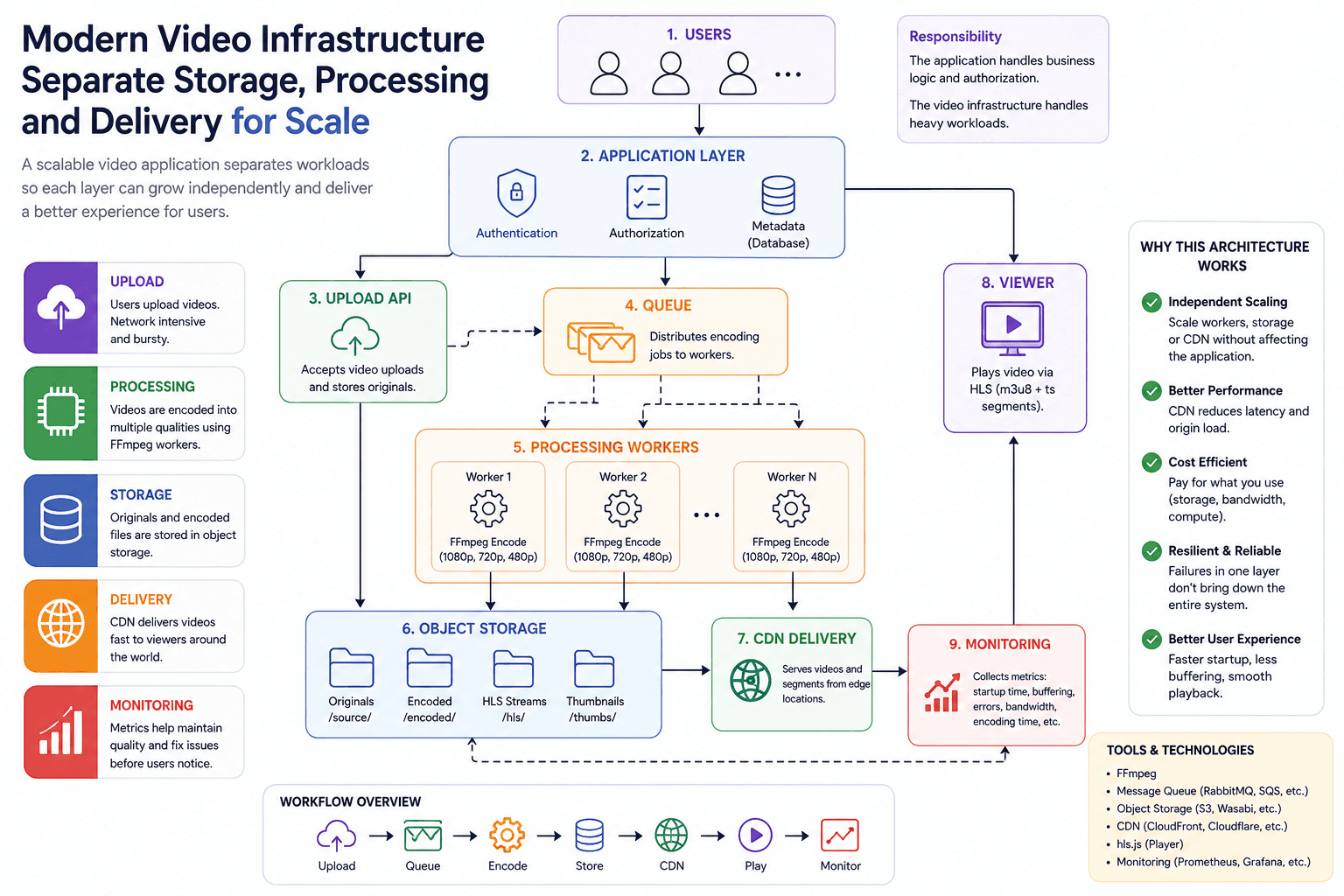
A Practical Architecture
For a growing video application, a reasonable architecture may eventually look like:
                    Users
                      |
                      v
               Web Application
                 /         \
                v           v
           Database      Upload API
                             |
                             v
                       Object Storage
                             |
                             v
                           Queue
                      /             \
                     v               v
                 Worker A         Worker B
                     \               /
                      \             /
                         FFmpeg
                           |
                           v
                     Streaming Output
                           |
                           v
                      Object Storage
                           |
                           v
                          CDN
                           |
                           v
                        Viewer
The value of this architecture is not that it contains more components.
Its value is that each workload can evolve independently.
Web traffic increases? Scale the application tier.
Encoding queue increases? Add worker capacity.
Media library grows? Scale storage.
Playback traffic increases? Optimize CDN and delivery.
That is a more sustainable model than repeatedly replacing one increasingly overloaded server.
Final Thoughts
The most important scaling lesson in video infrastructure is separation of responsibilities.
Video applications combine workloads with very different characteristics:
Application → compute and database

Encoding → CPU

Storage → capacity

Streaming → bandwidth
Trying to solve every growth problem by increasing the size of one server eventually becomes inefficient.
A better approach is to identify which resource is under pressure and separate that workload when the operational benefit justifies the additional complexity.
Start simple.
Measure queue time, processing time, storage growth and playback quality.
Then separate components based on actual bottlenecks rather than theoretical scale.
Good video architecture is not about having the largest number of services.
It is about ensuring that one workload cannot unnecessarily destabilize all the
.jpeg&w=3840&q=75)